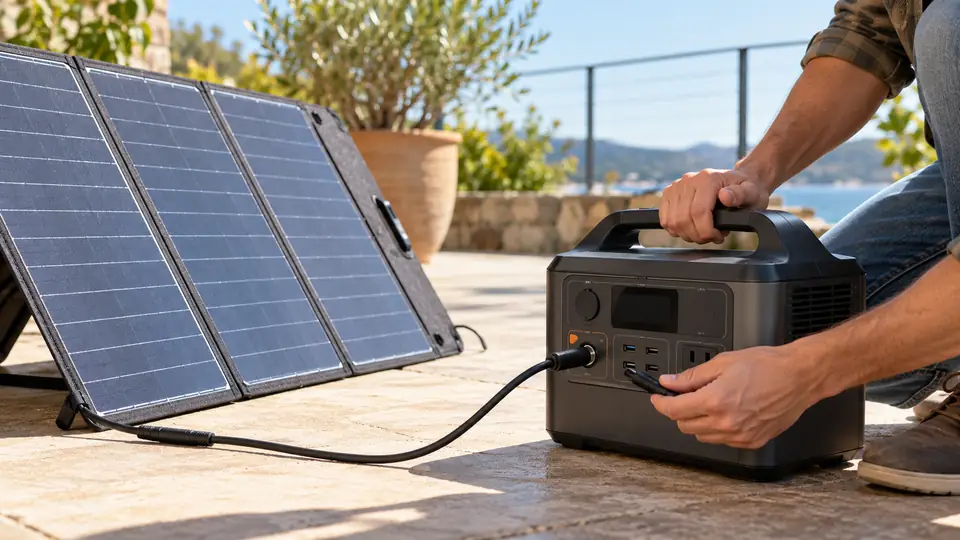
To charge a portable power station with solar panels, connect a compatible panel or panel array to the station’s solar input, place the panel in strong unobstructed sunlight, and confirm that the station displays charging activity. Compatibility depends on the station’s permitted solar voltage, current, input wattage, connector, and polarity. A panel that physically plugs in may still be electrically unsuitable, so check the exact specifications before connecting it.
How To Charge A Portable Power Station With Solar Panels
- Find the station’s solar input specifications. Check the manual or specification label for the supported solar voltage range, maximum open-circuit voltage (Voc), maximum input current, maximum solar input wattage, connector type, and polarity.
- Check the panel specifications. Identify the panel’s Voc, operating voltage (Vmp), operating current (Imp), rated wattage, connector, and polarity. Temperature can affect panel voltage, so the station’s maximum Voc limit must not be exceeded under relevant conditions.
- Inspect the equipment. Do not use a cable, panel, or connector with exposed conductors, cuts, crushed sections, corrosion, or signs of overheating. Keep the station and connections dry unless the exact equipment is rated for the conditions.
- Place the panel in direct sunlight. Face it toward the sun as practical and avoid shade from trees, buildings, vehicles, and camping equipment. Partial shading can reduce output substantially.
- Connect the panel to the station’s solar input. Use the supplied cable or an adapter approved for the exact station and panel combination. Do not force a connector or alter wiring to make incompatible equipment fit.
- Check the display or charging indicator. A suitable connection usually produces a solar input reading, charging icon, or rising battery percentage. The displayed input wattage can change with clouds, angle, temperature, and battery state.
- Monitor the setup. Keep cables clear of heat, water, sharp edges, and vehicle traffic. Check the station periodically for warning messages, excessive heat, or an unexpected loss of input.
Disconnect the panel before changing a series or parallel configuration. Follow the manufacturer’s connection order when the manual specifies one. Some systems permit multiple panels through approved connectors or a dedicated solar combiner, while others restrict the number or arrangement of panels.
Check Solar Panel And Power Station Compatibility
Solar charging works when the electrical characteristics of the panel array fall within the station’s input limits. Connector shape alone does not prove compatibility. The main specifications are voltage, current, wattage, polarity, and connection configuration.
| Specification | What It Tells You |
|---|---|
| Voc | The panel’s open-circuit voltage. The array’s maximum possible voltage must remain below the station’s permitted limit. |
| Vmp | The approximate voltage at which the panel produces its rated operating power. |
| Imp | The panel’s approximate operating current at its rated power point. |
| Rated wattage | The panel’s laboratory-rated output under specified test conditions. Actual input can be lower. |
| Connector and polarity | Whether the cable physically and electrically matches the station. A matching plug does not confirm full compatibility. |
| Station input limit | The maximum solar voltage, current, and wattage the charging system is built to accept. |
For a simple DC panel, the approximate relationship is watts = volts × amps. For example, a panel operating near 20 volts and 5 amps may produce approximately 100 watts under suitable conditions. This relationship helps explain the specifications, but it does not guarantee that a station will accept the full panel output.
Why Voc Matters
Voc is measured with the panel disconnected from a load. It can rise in cold conditions. A panel array that appears acceptable based on its operating voltage may exceed the station’s maximum input voltage when its open-circuit voltage is calculated. Never exceed the station’s stated voltage limit.
Series And Parallel Panel Connections
Connecting panels in series generally increases voltage while current remains approximately similar to that of one matched panel. Connecting panels in parallel generally increases current while voltage remains approximately similar to that of one panel. The exact result depends on the panels, connectors, wiring, and conditions.
Use series or parallel wiring only when the station and panel manufacturer permit the arrangement. Calculate the resulting Voc, Vmp, and current before connecting anything. A series connection can exceed a station’s voltage limit, while a parallel connection can exceed its current limit. Mixed panels can also produce unpredictable results unless the manufacturer provides a supported configuration.
How Long Does Solar Charging Take?
A rough ideal estimate divides the energy that needs replenishing by the charging input. For example, replenishing 500 Wh with a constant 100 W input gives an ideal estimate of 5 hours:
500 Wh ÷ 100 W = 5 hours
This is an ideal calculation, not a guaranteed charging time. A panel rated at 100 W does not deliver 100 W continuously throughout the day. Sun angle, clouds, shade, heat, dust, panel orientation, cable losses, controller behavior, and the station’s input limit all affect the result. Charging can also taper as the battery approaches full.
The station may display its actual solar input in watts. That number is more useful for observing current conditions than the panel’s nameplate rating. If the display shows 65 W, an idealized estimate for replenishing 500 Wh would be about 7.7 hours at a constant 65 W. Actual elapsed time can be longer because the input may fluctuate and charging losses occur.
Loads operating during charging reduce the energy available to refill the battery. If a connected device uses 20 W while the panel provides 80 W, roughly 60 W remains for battery charging before conversion losses and other system behavior are considered.
What Affects Solar Charging Speed?
- Sunlight intensity: Clouds and haze reduce available solar energy.
- Shade: A small shaded section can affect the output of a panel or panel string.
- Panel angle: A panel facing the sun generally produces more energy than one lying flat or facing away from it.
- Temperature: Heat can affect panel output and station operating limits.
- Panel cleanliness: Dust, leaves, and dirt block light.
- Battery state: Charging may slow as the battery nears full.
- Station limits: A station may accept less power than the panel array can produce.
- Wiring: Long, thin, damaged, or unsuitable cables can increase losses and create safety concerns.
- Connected loads: Devices drawing power during charging extend the time needed to reach the target battery level.
Solar Charging Problems And Safe Checks
If the station does not show solar input, start with simple external checks. Do not open the station or bypass input protection.
| Symptom | Possible Cause | Safe Check |
|---|---|---|
| No charging indicator | Loose connection, shade, damaged cable, or incorrect input port | Reseat the approved cable, confirm the solar input port, and move the panel into unobstructed sunlight. |
| Very low input wattage | Clouds, poor angle, partial shade, heat, or dirty panel | Remove shade, adjust the panel, clean it according to its instructions, and compare readings under improved sunlight. |
| Input warning or shutdown | Voltage, current, or wattage outside the station’s limits | Disconnect the panel and compare its specifications with the exact station limits. |
| Charging starts and stops | Changing sunlight, loose cable, temperature protection, or an unstable connection | Inspect the cable and connectors, improve panel placement, and check the station’s displayed warning. |
| Panel works with another device but not the station | Different voltage range, polarity, connector wiring, or input requirements | Verify the electrical specifications rather than relying on the connector shape. |
A USB-C port, car-charging port, and dedicated solar input may accept different voltage and current ranges. A panel intended for a small USB charging device should not automatically be connected to a station’s high-voltage solar input. Use the input method identified by the station manufacturer.
Can You Leave A Power Station Connected To Solar?
Some portable power stations support continued connection to solar while the battery is in use or full, but behavior varies by model. The station may stop accepting power, reduce the input, display a full-battery state, or impose temperature and operating limits. Check the exact manual for unattended charging guidance, pass-through behavior, and environmental restrictions.
Place the station where its vents are unobstructed and where rain, condensation, standing water, and excessive heat cannot reach it unless the exact model is rated for those conditions. A solar panel’s outdoor suitability does not automatically extend to the power station, cable ends, or charging adapter.
Safety Rules For Solar Charging
- Never exceed the station’s maximum solar voltage, current, or wattage.
- Do not connect panels with reversed polarity.
- Do not use improvised adapters or exposed wiring.
- Keep connectors dry and clean.
- Do not connect or disconnect damaged equipment.
- Keep cables away from hot surfaces, sharp edges, and areas where they can be crushed.
- Follow the station’s charging temperature range and low-temperature restrictions.
- Stop using the equipment if you see swelling, smoke, sparking, melting, leaking, unusual heat, or a burning smell.
For a reliable setup, record the station’s solar input limits and the panel array’s Voc, Vmp, Imp, and rated wattage before connecting them. Use the station’s displayed input reading to evaluate the setup under changing sunlight, and treat the panel’s rated wattage as a laboratory reference rather than a guaranteed charging rate.
